


LiveWell with Advocate Aurora
4.43.55K Reviews
App Specs
- Version
- 11.7.2
- Updated On
- License
- Free
- Downloads
- 1,000,000+
- Developer
- Advocate Aurora Health
- Categories
- Medical
- Platform
- Android, iOS
Screenshots


 Analysis by AppCompare
Before I choose a health app, I ask a practical question: will it help me handle the parts of care I already need to manage, or will it give me another place to check? LiveWell is most useful when your care is connected to Advocate Aurora Health and you want routine tasks and health details within reach. I would judge it less as a general wellness destination and more as a convenient companion to an existing care relationship.
That distinction matters. A hospital or clinic’s app can bring records and communication closer together, but it is not automatically a replacement for every health tool you use. If your main goal is to organize care from Advocate Aurora, the single-app approach may save effort. If you mainly want broad fitness tracking, independent symptom research, or a shared family health organizer, a different kind of app may suit you better.
Start with the care tasks you actually repeat
I’d decide whether to install it by listing the health tasks that regularly interrupt your day: arranging visits, checking a result, following a prescription, or sending a question to your care team. Those are the situations the app is presented as supporting. The value is not simply that the information is on a phone; it is that common administrative steps can sit alongside details related to your care.
It is a medical app from Advocate Aurora Health, rather than a universal portal meant to serve every clinic. That makes the fit personal: the closer your care is tied to this health system, the more relevant the app is likely to feel. If your appointments and records are spread across unrelated providers, you may still need other portals or methods to keep the complete picture together.
LiveWell is free, rated for Everyone, and has an average rating of 4.4 from around 17,000 ratings. It has been available since 2015, and its current version is 11.7.2. Those details suggest an established app with a substantial audience, but they do not tell me whether its particular tools match your providers or habits. I would treat the rating as one signal, not a guarantee that every workflow will feel smooth for every patient.
Your Health, All in One Place
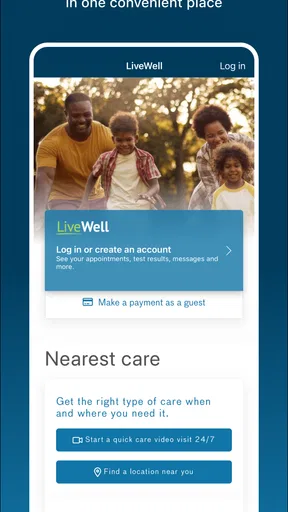
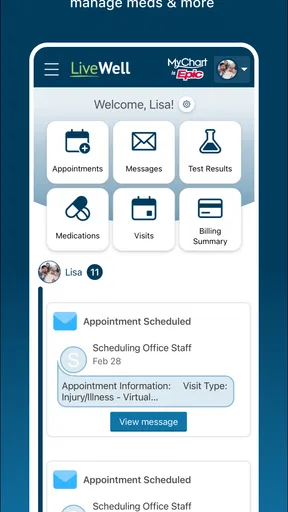
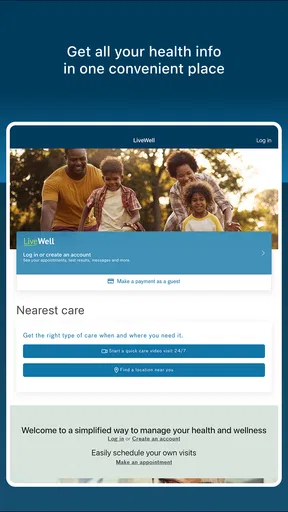
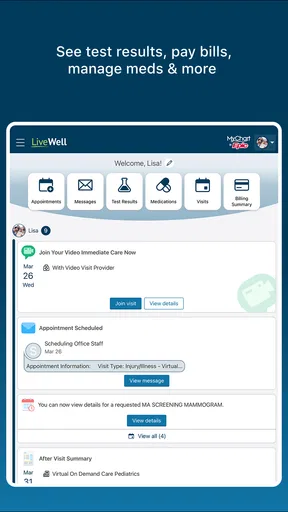
Have you ever wished you could manage all your health info without rifling through stacks of papers or endless emails? Well, LiveWell with Advocate Aurora has got you covered. The app brings together everything you need to stay on top of your health. From accessing your medical records to scheduling appointments, it’s all just a tap away.
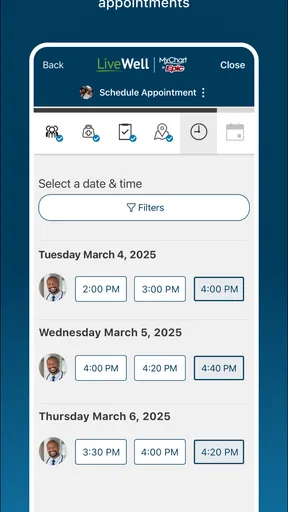
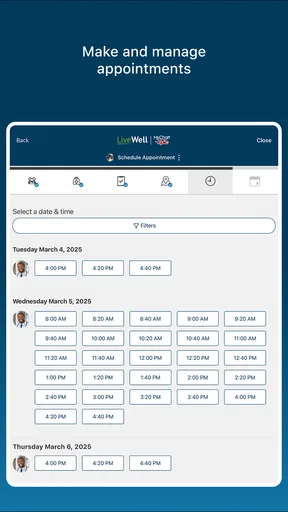
What I found super handy is the appointment scheduling feature. You can book, change, or cancel appointments right from your phone. No more waiting on hold or trying to remember to call during office hours. Plus, you get reminders, so you’re less likely to miss an appointment (we’ve all been there, right?).
Worth Reading Before You Choose

EA SPORTS FC Mobile 26 Is a Bigger Football Game, but It Takes Time

Flipboard Shows What News Apps Must Do Beyond the Feed

Switching to Android Auto Means Rethinking Your Driving Routine

Google Calendar Makes a Crowded Week Easier to Manage

Ludo King Makes the Most of the Minutes Between Plans

Baby Panda World Brings Quick Play to Modern Phones, but Its Game Library Feels Busy
Stay Connected with Your Care Team
Communication is key when it comes to healthcare, and LiveWell makes it easy to stay in touch with your doctors and care team. The secure messaging feature lets you send questions or updates directly to your provider. It’s like having a direct line to your healthcare team without needing to step foot in the clinic.
Not only can you keep up with messages, but you can also view lab results as soon as they’re available. No more waiting by the phone or guessing what your numbers mean. The app provides explanations and context for your results, which is super helpful if you’re not a medical expert.
Use the app to prepare, not just to look things up
A useful habit is to check the app before a scheduled visit and gather the questions you want to ask while the details are fresh. If a result prompts concern, I would use the available context to understand what I’m looking at, then bring questions to my provider rather than treating an app explanation as a diagnosis. Digital access can make information easier to reach; it does not replace a clinician’s interpretation of your situation.
Messaging is best for a non-urgent question that can wait for a reply. For a time-sensitive or serious health concern, I would use the appropriate urgent-care or emergency route instead of assuming that a message will be seen immediately. That small distinction helps set realistic expectations: a convenient communication channel is not the same thing as round-the-clock clinical attention.
Track Your Wellness Journey
Now, let’s talk about the wellness tracking features. Whether you’re trying to lose weight, manage a chronic condition, or simply stay active, this app has some neat tools. You can log your daily activities, monitor your diet, and even keep track of your medications. It’s like having a personal health coach in your pocket.
One feature I really appreciated is the medication tracker. It sends reminders for when to take your meds, which is great if you’re someone who tends to forget. Plus, it keeps a record of your prescriptions, so you always know when it’s time for a refill.
Make medication reminders work for real routines
For someone managing several prescriptions, reminders can be most helpful when they are treated as a prompt to check a routine, not as proof that a dose was taken. I’d build the habit of confirming each dose in the way the app supports, and keep a separate conversation with a pharmacist or clinician about changes to the schedule. A reminder can reduce forgetfulness, but it cannot decide whether a medicine should be started, stopped, or adjusted.
The refill record can also help before a busy week or a trip: reviewing prescriptions ahead of time gives you a chance to notice that you may need to request a refill. I would not wait until the last dose to check, since a tracker is useful only if the information stays current and the refill process still depends on the relevant care team or pharmacy steps.
Easy Navigation and User-Friendly Design
Let’s face it—no one wants to use an app that feels like a chore. Thankfully, LiveWell is designed with the user in mind. The interface is clean, intuitive, and easy to navigate. Even if you’re not particularly tech-savvy, you’ll find your way around with no problem.
The app also supports biometric login, so you can access your health info quickly and securely. No more fumbling with passwords or worrying about security breaches. It’s all about making your life easier while keeping your data safe.
Where a different tool may be the better fit
Compared with a general fitness app, LiveWell’s emphasis is closer to care coordination: appointments, provider communication, results, and prescriptions are more central to its appeal than a standalone exercise routine. A fitness-focused option may be a better choice if your priority is building workouts or tracking activity across services. Likewise, someone who wants a broad medical reference or symptom checker should not assume that a provider app is designed to answer every health question.
Compared with using a clinic website, phone calls, and paper reminders separately, keeping several care tasks together can reduce the mental work of remembering where to go. The trade-off is that the experience depends on your relationship with Advocate Aurora and on using the app as an additional route to care information. If your care is mostly outside that system, a different provider portal—or a simple calendar and medication routine—may be more practical than maintaining another account.
One realistic use case is a parent coordinating a child’s routine appointment while also keeping track of their own follow-up. Before the visit, they can check the relevant information, arrange the appointment through the app, and send a non-urgent question to the care team if needed. Afterward, they can look for results and review medication reminders as part of the household routine. It will not eliminate every call, form, or decision, but it can keep several recurring steps from getting lost in separate inboxes.
What to expect when you switch to an app-based routine
Moving from calls, email, or paper notes does take a little adjustment. I would start with one task—such as checking appointments—rather than trying to reorganize every health habit on the first day. Once you know where that information lives, add another routine if it genuinely saves time. This gradual approach also makes it easier to notice whether the app fits the way your care is actually handled.
For a household, it is worth deciding who will check which information and whose account is being used. Health records are personal, and convenience should not lead to mixing up one family member’s appointment or prescription with another’s. If you are helping someone else, make sure you understand the appropriate access and account process rather than relying on shared passwords or informal workarounds.
Another practical question is whether the app can replace your current reminders. I would keep a reliable backup during the transition, especially for appointments or medication routines that would be difficult to miss. Once you have confirmed that the app’s reminders fit your needs, you can decide which older alerts are redundant. That is more dependable than assuming a new tool has automatically taken over every part of an established routine.
The Verdict
So, is LiveWell with Advocate Aurora worth downloading? In my opinion, absolutely. It’s a comprehensive tool that takes the stress out of managing your health. With features that cater to both your medical needs and wellness goals, it’s a versatile app that fits seamlessly into your daily routine.
If you’re ready to take charge of your health journey, I’d definitely recommend giving LiveWell a try. Whether you’re scheduling appointments, checking lab results, or tracking your wellness, this app makes it all feel effortless. So go ahead, download it and live well!
My recommendation is strongest for people who already receive care through Advocate Aurora and want a more organized way to handle recurring tasks from their phone. It is also a sensible option for someone who prefers seeing appointment details, care-team messages, results, and medication routines in one place rather than relying only on calls and scattered notes. The app’s 500,000-plus installs show that many people have chosen to try it, but your own provider connection is the more important deciding factor.
I would hesitate if you expect one app to combine records from every unrelated healthcare provider, provide immediate answers to urgent concerns, or replace professional advice. It is also not the right primary choice if your main need is advanced fitness planning rather than managing care. In those cases, a provider-specific portal for the clinic you use most, a dedicated activity tool, or direct contact with a clinician may fit better.
For me, the strongest reason to use LiveWell is practical rather than flashy: it can make ordinary care tasks easier to revisit when life gets busy. I’d install it when Advocate Aurora is part of my care, try the appointment and information workflows first, and keep expectations grounded about what an app can do. If that matches your situation, it is a useful free medical companion; if it does not, choosing a tool built around your actual providers and priorities is the smarter move.
Pros
- User-friendly interface enhances accessibility.
- Comprehensive health tracking features.
- Seamless appointment scheduling.
- Secure messaging with healthcare providers.
- Integrated with fitness devices for better monitoring.
Cons
- Some features require a stable internet connection.
- Occasional syncing issues with third-party devices.
- Limited customization of notification settings.
- Potential data privacy concerns for sensitive info.
- Certain features locked behind a paywall.
FAQs for LiveWell with Advocate Aurora
What is LiveWell with Advocate Aurora, and what features does it offer?
LiveWell with Advocate Aurora is a comprehensive health management app designed to help users manage their healthcare needs effectively. The app offers features such as appointment scheduling, access to medical records, lab results, and personalized health tips. It also allows users to communicate with healthcare providers, refill prescriptions, and track their wellness goals.
Is LiveWell with Advocate Aurora available for both Android and iOS devices?
Yes, LiveWell with Advocate Aurora is available on both Android and iOS platforms. Users can download the app from the Google Play Store for Android devices or the Apple App Store for iOS devices. Ensure your device meets the minimum system requirements for a smooth experience.
How does LiveWell with Advocate Aurora ensure the privacy and security of my health information?
The app prioritizes user privacy and security by employing advanced encryption methods and adhering to HIPAA guidelines. Personal health information is securely stored and only accessible to authorized users. Additionally, users can enable biometric authentication, such as fingerprint or facial recognition, for added security.
Can I use LiveWell with Advocate Aurora to schedule appointments with my healthcare provider?
Yes, LiveWell with Advocate Aurora allows users to conveniently schedule appointments with their healthcare providers directly through the app. Users can choose from available time slots, receive appointment confirmations, and even set reminders. This feature streamlines the scheduling process, saving time and reducing the need for phone calls.
Does LiveWell with Advocate Aurora provide support for tracking wellness goals and health metrics?
Absolutely. The app offers tools to help users set and track wellness goals such as exercise routines, nutrition plans, and medication adherence. Users can input health metrics like weight, blood pressure, and glucose levels. The app also integrates with various health devices and wearables to automatically update data, providing a comprehensive overview of your wellness journey.


